How to Create a Bitcoin Wallet With Dice Rolls

Why Roll Dice to Create a Bitcoin Wallet?
In late July 2026, a bug in Coldcard firmware was made public. It caused users' seeds to be generated with far less entropy (randomness) than intended, leading to semi-deterministic seeds that bad actors exploited. The result: over 1,300 bitcoin swept from users' wallets-- over $100 million worth. These users did everything right, and they still got their bitcoin stolen.
Users who added entropy via passphrases (guide here) or dice rolls were unaffected, since that bypassed Coldcard's RNG method entirely.
This event opened the eyes of many, including myself. I've since decided I will no longer rely on any manufacturer's RNG alone. Instead, I'll use good, old-fashioned randomness I can see and feel-- dice. By rolling a well-balanced 6-sided die 50–100 times, we can generate our own entropy to produce a bitcoin seed. In this guide, I'll show you how I did exactly that, and how you can do the same. This way, you're immune to this kind of exploit in the future.
What You'll Need
You only need a few things:
Prepare your environment
We'll use Ian Coleman's BIP39 Tool to transform dice rolls into a seed phrase. Download it first, then turn off your wifi/internet before entering any dice rolls. The tool runs entirely in your browser with zero server calls-- going offline guarantees your entropy never touches a network.
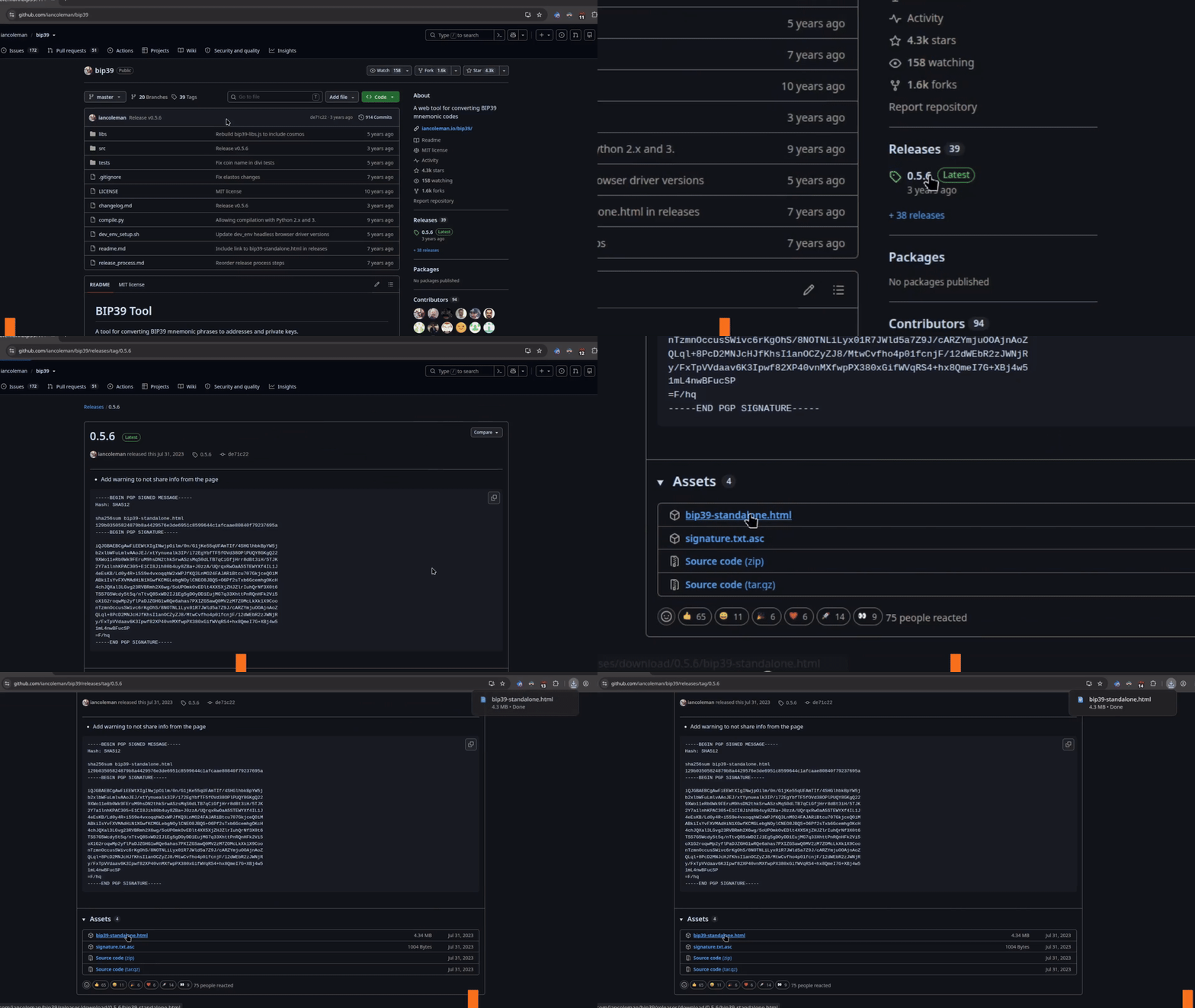
Download the standalone tool
Go to the project repository, click Releases on the right, and download bip39-standalone.html from the latest release (0.5.6 at the time of this writing).
Open Ian's BIP39 tool
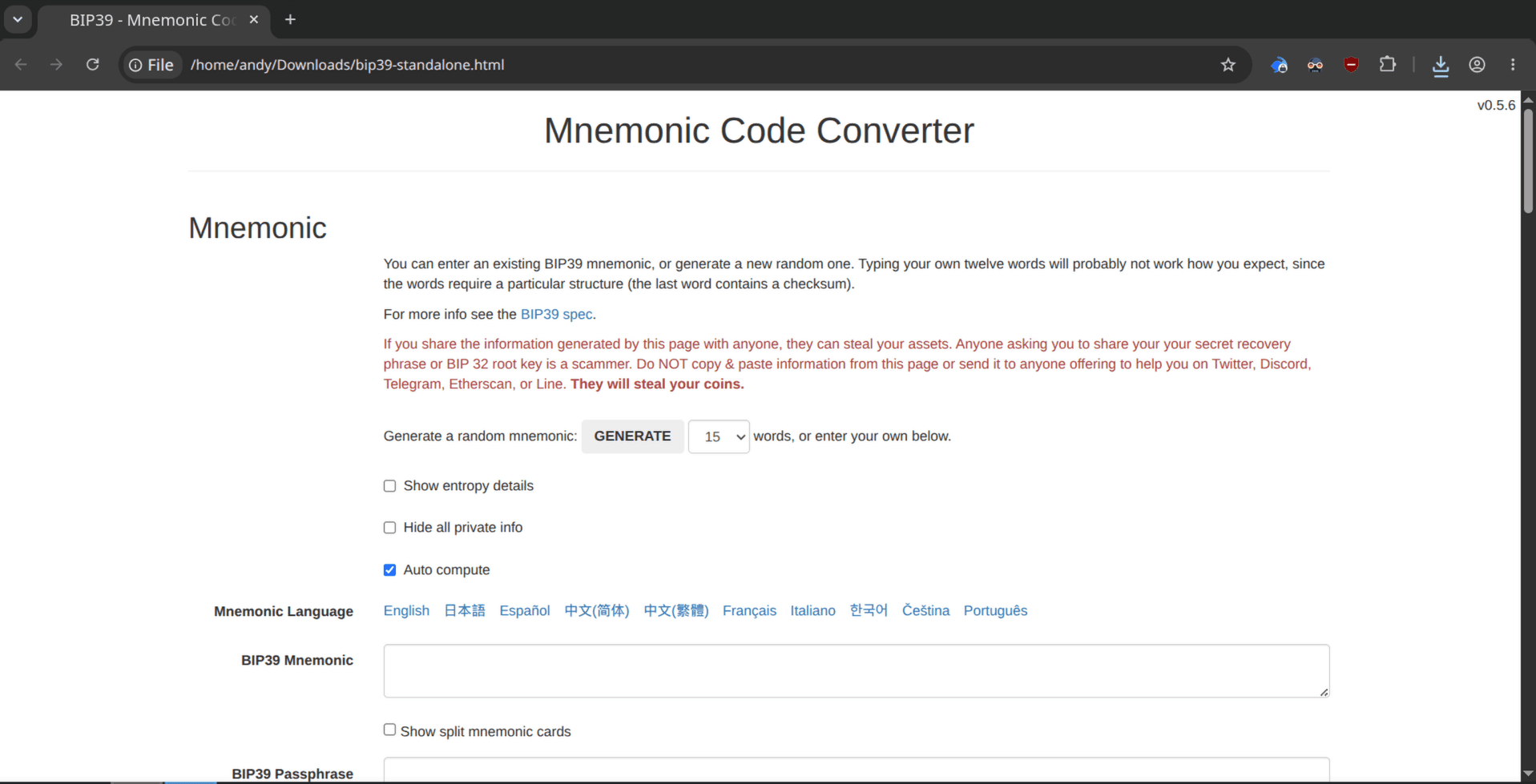
Now open the .html file you just downloaded. Double-click it from your Downloads folder and it'll open in your browser like any other webpage. But if you look at the address bar, you'll notice the URL doesn't look like a normal website-- there's no https:// or .com. That's because this page is stored right on your computer. It's not coming from the internet, which means you don't need to be online to use it. Still, flip the switch and turn off your laptop's WiFi for an extra layer of safety before we do the next steps.
Prep the Tool for Dice Rolls
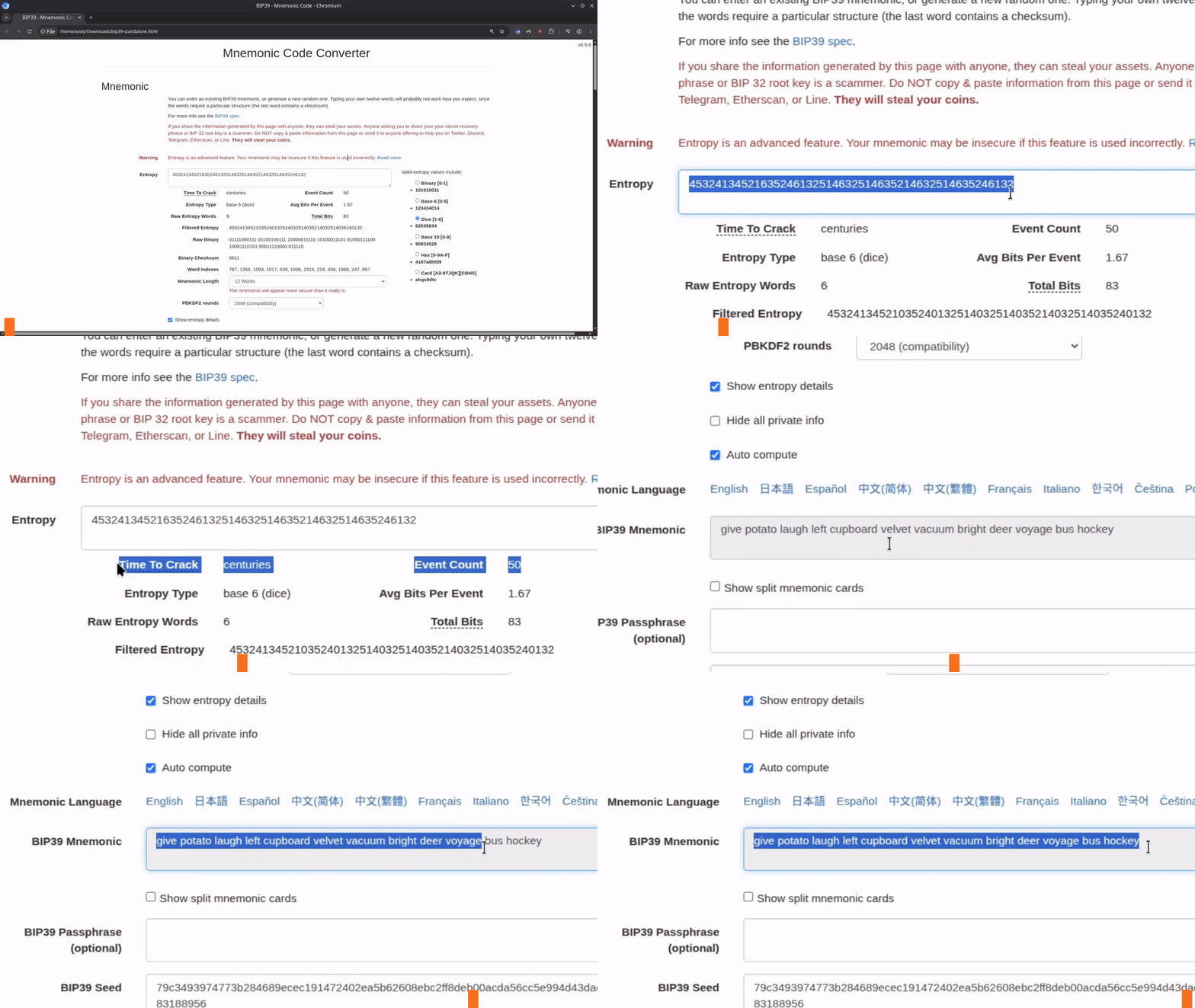
- Check the Show entropy details box
- Select the Dice options from the Valid entropy values on the right side
- Select 12 Words or 24 Words from the Mnemonic Length dropdown. DO NOT SELECT "Use Raw Entropy".
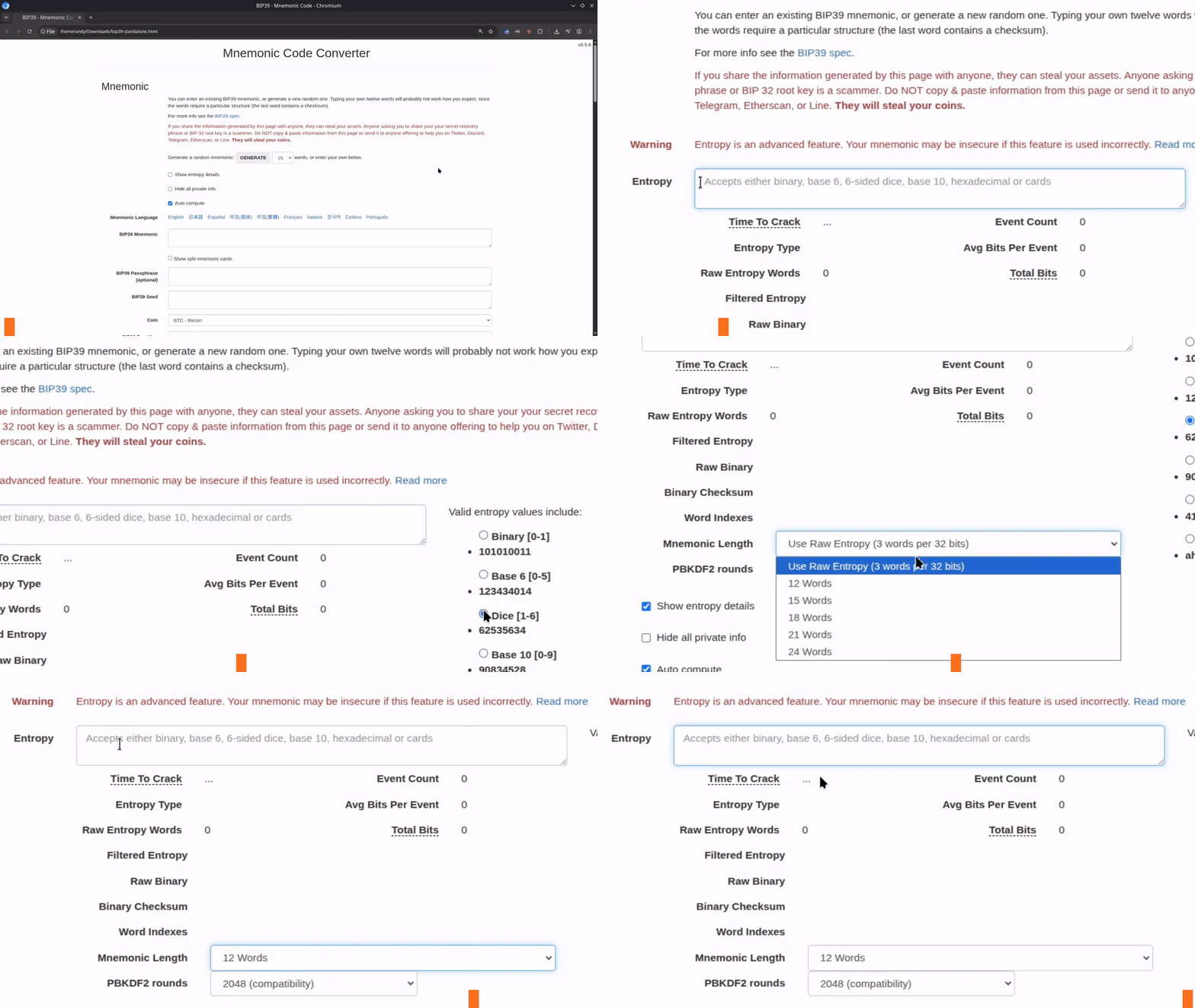
You are now ready to start rolling the dice.
Roll the Dice
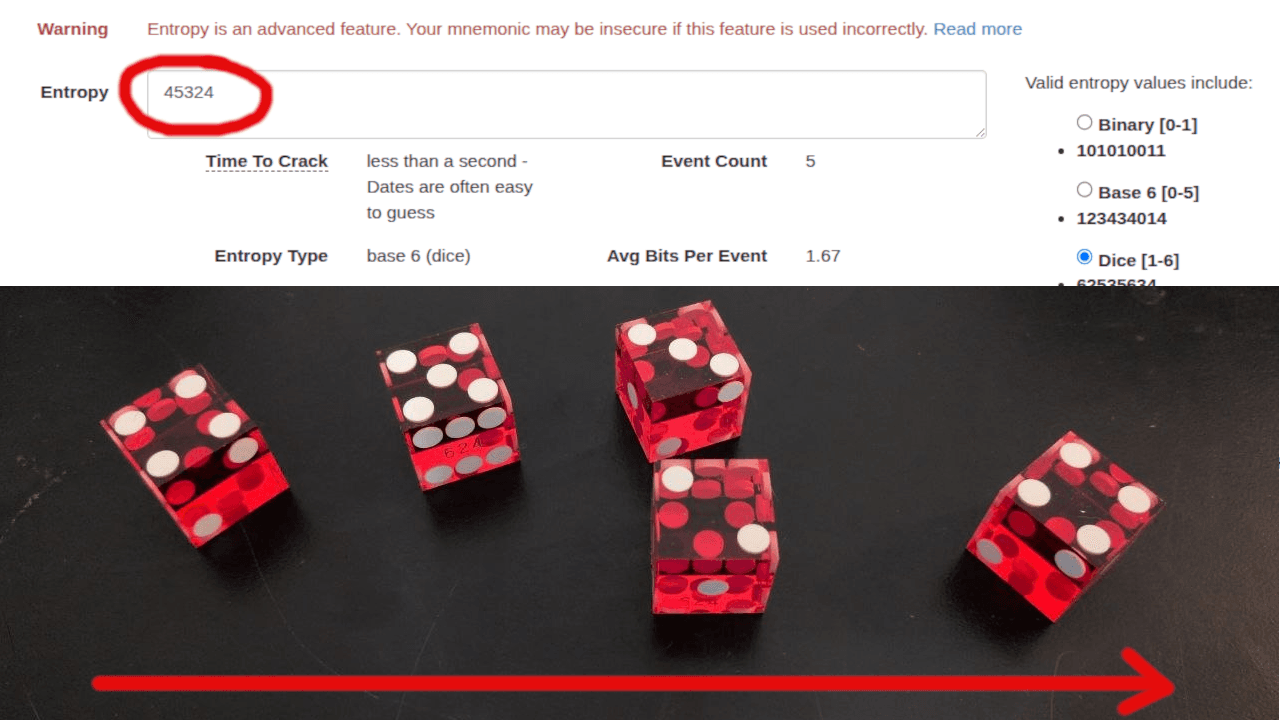
Start rolling the dice and enter each result into the Entropy field, left to right.
The number of rolls you need depends on your selected word count. This tool is conservative by design, so you'll see a warning that says The mnemonic will appear more secure than it really is.
- 12 Words (128-bit): 50 rolls minimum. The warning clears at about ~80 rolls
- 24 Words (256-bit): 100 rolls minimum. The warning clears at about ~150 rolls
Get Your Seed Phrase
After rolling your dice enough times for your mnemonic length and entering them into the Entropy field, the tool outputs your checksummed seed phrase.
You just created a Bitcoin mnemonic from dice rolls. Make sure to write this mnemonic down and store it in a secure location.
Note on checksum: The last word in a BIP39 seed phrase isn't a random dictionary word-- it's a checksum computed from the previous ones. If you mistype a word, the checksum fails and the wallet rejects the phrase as invalid.
Import Into Sparrow Wallet
Now that you have a generated mnemonic from dice rolls, import it into Sparrow so you can actually use the wallet. It's optional but recommended to add a unique passphrase of at least 20 characters for extra security. Write it down and store it separately from your seed phrase-- without it, you will not be able to recover the wallet.
Open Sparrow, click File > New Wallet, enter a name, click New or Imported Software Wallet. Under Mnemonic Words (BIP39), select 12 or 24 words from the dropdown depending on what you generated, then enter your passphrase. This video is out of context but shows the import steps plus the test receive/send flow I run before sending real funds to any new wallet. You should always perform a recovery test and a send/receive test before sending any real funds to a new wallet.
You're in Control Now
The Coldcard bug that kicked off this guide was a wake-up call-- even the best hardware wallets can have flaws in their random number generation. By rolling dice instead, you're not trusting Coldcard's RNG, Ian Coleman's RNG, or any manufacturer's RNG. The only randomness in your seed came from a die you held in your hand and rolled yourself. Hardware bugs, supply chain attacks, compromised firmware-- none of it matters for entropy you generated with your own two hands. That's the part no exploit can touch.
One More Thing...
I send alerts when bugs like this surface, tooling updates, and my unfiltered thoughts on Bitcoin security. Subscribers also get a free copy of 10 Operational Practices That Help You Keep More Bitcoin Over Time-- UTXO management, fee strategy, and the edge cases that get people after setup is done.
If that sounds useful, drop your email here and I'll send the PDF straight to your inbox.
Need more hands-on help? I do 1-on-1 consulting for Bitcoin self-custody, wallet setup, and everything else covered here. Book a free 15-minute discovery call and we'll figure out if it's a fit.